I got nerd sniped
sshh, the latest brain child of mine
12 min read
What the hell happened? What even is "nerd sniped"? According to Urban Dictionary it's
The state of a nerd so deeply engaged in one of their areas of interest they are unaware of anything else.
Well, I was relaxing one evening just watching some YouTube when I came across a video titled 13 INSANE Front-End Project Ideas That Will RUIN Your Mental Health by a dude named Manware. One of the projects he mentioned really stuck with me when I heard it. A terminal-inspired, local only, encrypted, note taking app. It instantly buried its way into my brain, and connected some dots I didn't know were floating around in there. I won't get super technical in this blog, my brain hurts from work and this project, so cut me some slack.
I've been wanting to play with React for a bit now, and have been doing some research into all the latest and greatest parts and pieces. I've been hearing a lot about a framework for React called TanStack and it seemed to be a perfect fit. They have several pieces that can be plugged in, and boy does it make working with React a breeze!
Angular was my entry into TypeScript, I did a lot of research into Angular and React when I was working on the Tera Raid Info project. I went with Angular at the time as it seemed more "it just works" out of the box. The docs made sense to me and I was able to hack my way into what that project is today. React at the time felt like it was a great framework, but the styling and the syntax honestly pushed me away.
However, the new age of the web is React over Angular, and I get why after using both. Angular feels like it pushes you into a way of design and structure, which I kind of like as it's what I'm used to. React on the other hand, allows you to build however you want, and just gives you the wires to make it all happen.
TanStack helps leverage the power of React, by offering their Router, which is perfect for a Single Page Application (SPA) like mine. I like that it's fully TypeScript compatible, and really gives you more features than I need for this, but I can see why it's very popular. The main goal of the app was to be local first, so having it store all the data in the browser was key. I've worked with IndexedDB in the past using Dexie and was going to use that until I saw TanStack had a DB package that worked with the RxDB Collection. It is more powerful than I need for this project as it offers syncing and replication, but offers a solid backbone to my needs.
Next came encryption, and all of that is handled with the Web Crypto API which is standard, and won't have to reinvent anything. I planned to encrypt everything that is stored into the collections, so even a snooper couldn't just Ctrl+Shift+I their way into your stuff. But that starts another problem with it being a terminal like app. It would be super expensive, not monetarily but in terms of CPU cycles and such, to have to decrypt the data in the collections every time you wanted to search for a note or do anything with the persisted data.
I needed to keep a map of some of the data from the collections, like note/folder name, tags, etc., without having to hit the collections each time and decrypt it just to access it. TanStack has Store which is exactly what I was needing, and enables what I call the LiveMap. This is the layer between the terminal, and the RxDB collections. It holds the unencrypted metadata of the notes/folders but not the note content. All you have to do is basically define the store, and you have access to set/get the store data when and however you like.
With all of that figured out, I began learning my way through the project. I started the project with a scaffold of TanStack Start, as that's what I thought I needed at the time, turns out I just need Router. Before I figured that out though, I made sure the project worked, and figured out how it all worked. That was a bit of a waste of time, as Start gives you everything you need for SSR (Server Side Rendering) which is not what I needed. I spent some time taking out the pieces I didn't need from the project, and converted it into a proper SPA scaffold.
I ripped out all the demo and routes that came from the scaffold, swapped to Bun (Side note, really liking Bun over NPM), and started work on getting XTerm.js implemented. That took me longer than I thought it would, trying to figure out how to make the terminal show up was a head scratcher, but finally figured that out and was simpler than I was making it out to be. I started playing around with the onData and attachCustomKeyEventHandler of the terminal to capture events and input. The issue was that everything was being done in the useEffect and was not the best way to do it. So I swapped the terminal into a Service and added a hook that referenced that, and then the component just rendered the terminal. I did some more tinkering of the terminal service and cleaning up in terms of reusability and splitting out the responsibilities of the service. I created custom Keyboard Events to handle with the terminal for Copy/Paste. Created an SVG and got the PWA Asset Generation hooked up and working. Finished off with playing around with the input buffer for Shift+Enter support (eventually took it out), and backspacing the newlines out.
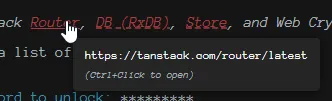
By this time, the terminal service had grown to almost 600 lines of mixed concerns out the wazoo, but this is how I like to build. I put something down, play, test, get it working and then refactor like my life depends on it. First, create the input buffer and link pop managers, these allow me to pass the input into a service that just returns the result of that, instead of the service doing all the logic. The link pop manager is just to format the links in the motd so they are styled and act properly (hover state, and controlled click), like so:
I then created the terminal addon service, it just makes sure the ones I am using are loaded into the terminal instance and properly disposed of. Then I just had to create the terminal writer, just to handle all the output to the terminal better, plus gets the giant welcome message text out of the way. Finally, the terminal config file. Just sets all the config options I was using into a dedicated wrapper, not entirely needed but good for cleanup. With all of that combined, the terminal service went down to just under 300 lines!
Then came time to get the encryption service implemented. I generate a salt using Uint8Array with a length of 16 bytes and then pass that salt to the crypto API to getRandomValues based on that salt. That salt gets stored into the config collection, but I am also going with a Canary approach, so that's why. That just means I have a piece of data that is encrypted with the Salt + Password and then that value is stored, you can use that to confirm if the user has put in the proper password. I wrote some unit tests to confirm the logic worked how I wanted, and started working on the Store implementation. I created a hook to use with it so I could track the current folder and if the vault was locked/unlocked. Finally, I just wired those pieces into what I had done and man, what great progress!
Next came the RxDB and LiveMap implementations. Started with the RxDB as without the data first, the LiveMap won't do anything. Nailed down the schema's, created the storage service with CRUD like functions, and created the hook. Which at the time I thought was right, cause how else would you use the Store? Going down that route, I setup the LiveMap with the events to handle everything. In my copy/paste rename process, I got lost in the sauce and started making the LiveMap like its own Store->DB collection, and basically was just done wrong. It should NEVER store its data to the collection, it is the middleman for a cache like system. A bit of refactoring of the Session store and service, unit tests of the Storage, and hey look at that it's running still and my basic operations are working.
At this point, I was at a cross-roads. Do I keep chugging along with what I have, start shoving commands and handlers into the terminal service, only to end up rewriting it later? Or spend two days creating a command framework that mimics the command systems I've used in past Discord/Twitch bots? You already know the answer to that.
First, that requires a major architectural redesign. Everything related to the terminal was stuff into /src/services and if I wasn't going to be the overhaul gremlin I am, that would have been fine and worked. I changed the design to have it broken down better, with a folder for the terminal, session, storage, commands, etc. With that out of the way, I created Validators for the Names and Paths. Speaking of Paths, created a Resolver that builds the path based on the metadata and validates the path is an actual path in the collection. All of this to simulate the cd nature of the terminal. I created an editor Store for when the vi command is called, it opens a slim modal with the note content, this tracks that state of the modal and events. I then created a command history Store so it tracks the latest 100 successful commands entered, and can be scrolled through with the up/down arrows. Again, I really wanted that terminal vibe, this idea sunk in hard. I then got side tracked with images working in the terminal, so got that knocked out after a bit of trial, error, and regex magic.
Here comes the meat and potatoes of this project, in my eyes, the command system. Like I mentioned earlier, I've written some Discord and Twitch bots, and used different frameworks for those to handle the commands. With Discord for example, the framework I last used, you'd mark your command with the proper implements, and you'd register the commands at build and voila, your Discord message is now a command! Granted, that's a high level view, but you get the idea.
First, the Command Registry service. The point of this is to register the commands, aliases, and execution. This is what holds the information of what commands are available, what aliases, parsing the input, and command validation. Without this, what's the point of the command system? Next came the Command Initialization, and this is just what fills the Registry with the available commands and aliases. I then created a Command Context, this is so I can pass around the current folder, and the session/storage service through Dependency Injection. Next came the Command Result, so that way the command system isn't responsible for any state, UI, or terminal changes. It just passes back if it was a success, error, and metadata. Finally, came the abstract Command class. This allows you to create the commands, validate the arguments, execute, and return the result. It has a getHelp method that returns the command metadata you set when creating the command, and this powers the help command to get that data dynamically instead of having to hardcode anything.
With that high level change done, I started creating the commands. First was the help command, the class inherits the Command class we created earlier, set the metadata, and use the Registry to pull all available commands. For now, it just shows this command when executed, but it's a start. Wired up the clear command with a cls alias, took no time to implement the behavior into the UI as well. Then the laundry list of commands:
- ls
- cd
- mkdir
- pwd
- touch
- motd
- cat
- mv
- rm
- find
- grep
- lock
- vi
I did end up adding a debug command, to track the LiveMap and make sure that was working accurately. I was planning on taking it out before "launching" but it is fine, it's all local and your data, and that LiveMap is cleared upon vault lock and rebuilt when it's unlocked, so it's not always kept in memory. It looks like this:
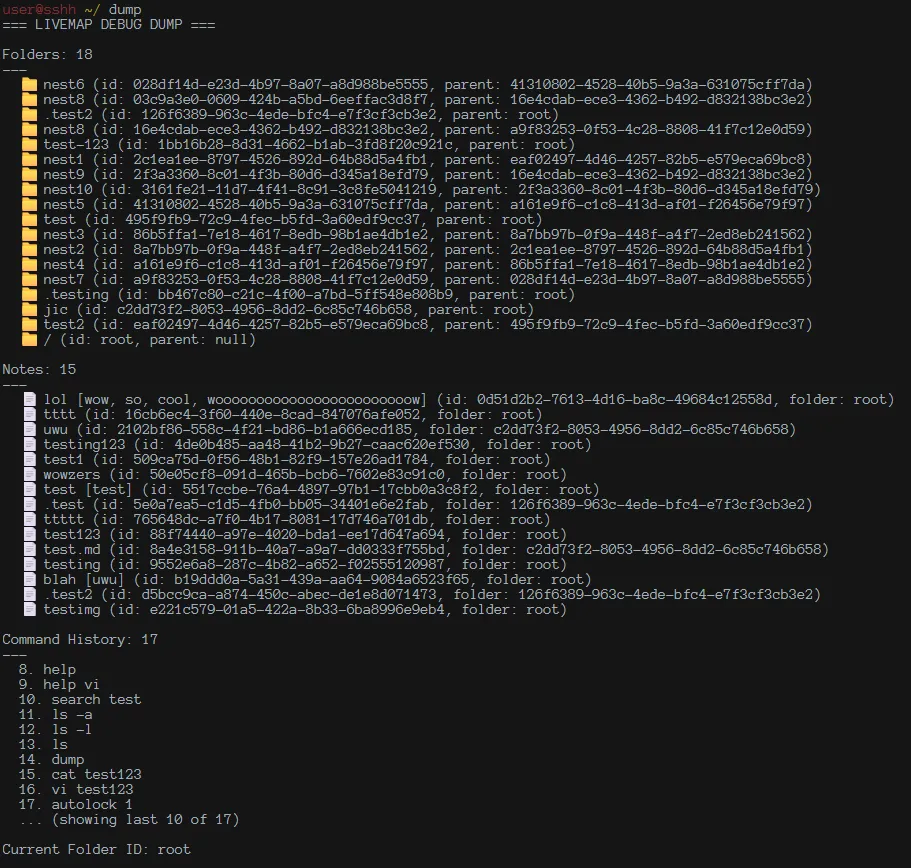
I had changed the command history schema a bit, and so this doesn't show the 100 capped list, and not doing a migration in dev mode.
I added in the suite of unit tests, and got those passing.
I then got an idea for someone like me, who swaps browsers a lot (I can't make up my mind, don't judge me!) and don't really use PWA sites too much. Ironic. Anyway, I added in a tar command that exports your data into a .json file and it is all encrypted still. Then a mnt command to import that data, and re-encrypt it with your new key. It prompts for the password you used when you created the vault, so if you don't remember that, good luck!
Did more code cleanup, tweaks, bug fixes, and the like, thanks to Code Rabbit annoying me about things. Added in a autolock command, that allows you to configure how long the terminal is unlocked for, and can be disabled.
And that's about it, really. Like I said, wasn't going into high level, I'm tired, but wanted to write something about this project as it was a lot of fun and I really enjoyed making this! I do have future plans to add in autocompletion based on the command history, and add in NVim key binding support into the editor modal, as I'm trying to get used to that instead of IDEs. No future plans on when those will happen, as they're not a priority and my brain feels like an itch has been scratched.